A guide to your Backerkit experience for Legendary Metal Coins season 8
, by Evangelos Foskolos,
6 min reading time
Hey dear backer,
thank you for joining us! Here is a handy guide we put together to help you complete the pledge manager easily.
Examples
To walk you through the process we have 2 fictional examples for you, Benjamin the Blue, who "selected 4 Standard sets during the Kickstarter campaign and Purple Pola, who selected a Custom Set. Most of the steps are the same for both but Step 3 is for Benjamin and Step 6 is for Pola (and Benjamin because Benjamin wants to get more cool coins).
First Step: Find your invitation (All Backers)
Everyone has received an invitation through email. You have received this in the email account that you used to back this Kickstarter but if you don't find it there is a good chance to be in Promotion or Spam folder if you use Gmail or Junk if you use Outlook (or something similar if you use something else.
Step 2: Backerkit Welcome Page (All Backers)
The first thing you see when you accept your email is a description of your project. You'll need to add your country and region to start the process. You are also able to switch pledge if you decided you want to get more coins .
Example: Benjamin is happy with his current selection so he selects the Belgium as his country so he's also getting charged VAT, and clicks "Get Started to continue".
Step 3: Newsletter Question (All Backers)
The first question will be asked to all backers. We would love to add all of you to our newsletter list but we want to ask you first, it's more polite this way :)
Have in mind that we don't spam, we only send an email every 2-4 weeks.
Step 4: Select your coin sets (only for backers that selected 1 or more Standard Sets)
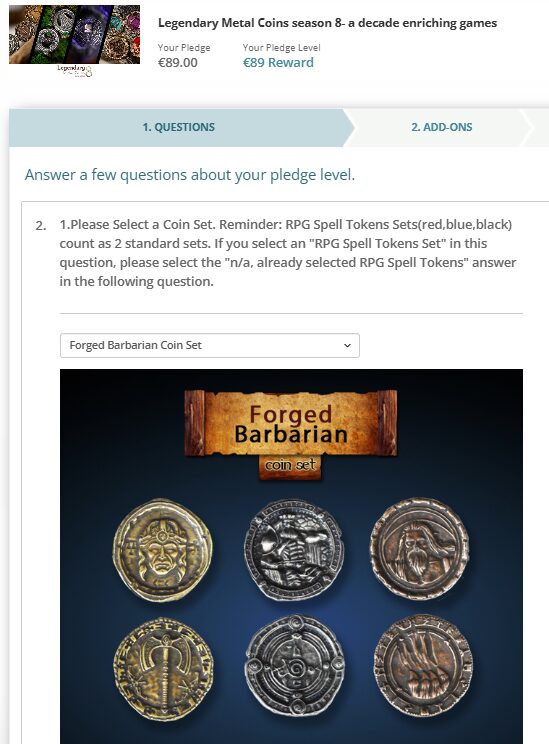
If you have selected multiple coin sets you will be asked to select them in this stage. There is a dropdown menu for each question with all the coin sets we have available.
As soon as you click on a choice it will load an image of the coin set so that you can be sure that you are selecting what you want. All the brand new season 8 coins are all together at the bottom of the selection list. All the coin sets include 20 coins (+Stretch Goals) with the Unit coins including 34 coins (+Stretch Goals).
Also, we want to remind you that RPG Spell Tokens Sets (red, blue or black) count as 2 coin sets. If you select any of them, please use the selection of the next set as a N/A.
George the Grey selected the Forged Barbarian coin set as 1 of his 4 sets.
Step 4B: Custom Set Coins
You'll be able to select the 20 coins of your custom set through 20 different selections with dropdown menus.
Selecting a coin also gives you a visual of how the coin looks to be certain of your selection.
Step 5: Add-Ons (both Kickstarter add-ons and new ones)
After selecting the coins of the core pledge you can browse around all our selections to get more coins, either in sets or in bulk. You can also grab some of our velvet pouches or Legendary Dice Bags to store them in style.
This is also where you will be choosing which single coins or coin sets you're getting even if you added them on Kickstarter (you're not getting charged extra, you're using the funds you already provided).
IMPORTANT: If you would like to select a Custom Coin set as an add-on, please select all the coins you would like to get an email us. We will add your discount manually depending of how many coins you selected (aka how many custom sets you received- 1 for 20 coins, 2 for 40 coins, etc).
Step 7: Confirm Shipping
We need your shipping address to arrange where to ship the coins. You also don't need to worry If you move before we start shipping the coins. We will be able to update the address for you.
Final Step: Confirm Order
In the final page you will see all the order details, including your pledge, your shipping address and all the Add-Ons you selected. You will need to provide us with your credit card to charge you for the extra coins that you have added and for any VAT fees if you are required to do so. These extra costs will be charged after your pledge is locked, in a few weeks.
And that's it! If you need help to find your invite or have any questions about the process you can let us know in the Kickstarter comments section or if you have a particular question about your pledge you can email us at support@drawlab.com
Thank you for supporting our Kickstarter campaign, Drawlab Entertainment